
All in One View
Content from Command Line
Last updated on 2026-10-22 | Edit this page
Estimated time: 34 minutes
Overview
Questions
- How can I make my results easier to reproduce?
Objectives
- Introduce Zipf’s Law project.
- Introduce git branches.
- Illustrate pain and fragility of building with editor and sequences of command line commands.
Let’s imagine that you are writing code for a research project to test Zipf’s Law.
Zipf’s Law
The most frequently-occurring word occurs approximately twice as often as the second most frequent word. This is Zipf’s Law.
We have set up a git repository with a sequence of branches to step through the tutorial today. You should start by cloning the repository
OUTPUT
Cloning into 'work_dir'...
done.
Change to the new directory, checkout the branch 06-documentation, and list the branches
OUTPUT
* 06-documentation
  remotes/origin/01-command-line
  remotes/origin/02-first-makefile
  remotes/origin/03-no-hands
  remotes/origin/04-testing
  remotes/origin/05-standards
  remotes/origin/06-documentation
  remotes/origin/HEAD -> origin/06-documentation
Today, we will start with the branch 01-command-line and step through the numbered branches arriving at the branch 06-documentation which uses all of the tool we will introduce.
First let’s peek at the final results
View the result with (depending on your OS)
View the result with (depending on your OS)
Let’s take a couple of minutes to skim the document.
Now clean up and start with the 01-command-line branch
The output of the last command should be
OUTPUT
  06-documentation
* my-01-branch
  remotes/origin/01-command-line
  remotes/origin/02-first-makefile
  remotes/origin/03-no-hands
  remotes/origin/04-testing
  remotes/origin/05-standards
  remotes/origin/06-documentation
  remotes/origin/HEAD -> origin/06-documentation
Look at the files the files that git provides and in the directory
OUTPUT
.gitignore
README
abyss.txt
analyze.py
isles.txt
local.bib
report.texOUTPUT
README     analyze.py  local.bib   src
abyss.txt  isles.txt   report.tex
The directory src is left over from using the 06-documentation branch for the preview. Let’s remove it
$ rm -r srcNow build the document pdf by following the instructions in the README file.
OUTPUT
To build report.pdf we need the following:

1. Insert data from abyss.dat into report.tex

2. Insert into report.tex counts of the two most frequent words and
their ratio for abyss.txt and isles.txt.

3. The figure files abyss.pdf and isles.pdf

One can generate the required information and build the document as
follows:

1. From the command line, run

    $ python analyze.py abyss.txt abyss.dat abyss.pdf
    $ python analyze.py isles.txt isles.dat isles.pdf

2. Enter the top_two counts reported above into the report.tex source
with the calculated ratios.  It should look like this:

    Book & First & Second & Ratio\\ \hline
    abyss & 4044 & 2807 & 1.44 \\
    isles & 3822 & 2460 & 1.55 \\
    \hline

3. Copy and paste the first two items in each of the first ten lines
from abyss.dat into report.tex.  Those lines should be:

    the 4044
    and 2807
    of 1907
    a 1594
    to 1515
    in 1221
    i 974
    was 695
    it 680
    for 675

4.Run latexmk to build the document:

    $ latexmk -pdf report.tex

If you are not sure you did it right, you can start over by running:

    $ rm *.dat *.pdf *.aux *.bbl *.blg *.fdb_latexmk *.fls

or if you have clobbered some source files:

$ rm * ; git checkout .- We hope to improve on executing instructions from a README.
Content from First Makefile
Last updated on 2026-10-22 | Edit this page
Estimated time: 49 minutes
Overview
Questions
- How do I write a simple Makefile?
Objectives
- Introduce key parts of a Makefile, rules, targets, dependencies and actions.
- Run Make from the shell.
- Edit a Makefile.
- Explain when and why to mark targets as
.PHONY.
Save your work from the previous episode and checkout the branch for this episode:
BASH
$ git add report.tex
$ git commit -m "my work"
$ git switch -c my-02-branch remotes/origin/02-first-makefile
$ git ls-files
which should yield
OUTPUT
.gitignore
Makefile
README
abyss.txt
analyze.py
isles.txt
local.bib
report.tex
Look at the file called Makefile with
OUTPUT
SHELL=bash

# First target, report.pdf, is the default.

report.pdf : local.bib report.tex abyss.pdf isles.pdf results.tex abyss.head
	latexmk -pdf report.tex

# Using a new feature of gnu-make as of version 4.3 that permits making
# several targets with one rule.  See
# https://www.gnu.org/software/make/manual/make.html#Multiple-Targets

abyss.dat abyss.pdf abyss.two &: analyze.py abyss.txt
	python analyze.py abyss.txt abyss.dat abyss.pdf |tee abyss.two

isles.dat isles.pdf isles.two &: analyze.py isles.txt
	python analyze.py isles.txt isles.dat isles.pdf |tee isles.two

results.tex: abyss.two isles.two
	@echo Create $@ with an editor from $^ ; exit 1

abyss.head: abyss.dat
	@echo Write a rule in the Makefile to create $@ from $^ ; exit 1
This is a build file, which for Make is called a Makefile - a file executed by Make. All of the indentation in this Makefile consists of TABs. It is unfortunate that while the difference between TABs and multiple SPACEs is invisible, the difference is significant for the program make.
If we try to run make we get
OUTPUT
python analyze.py abyss.txt abyss.dat abyss.pdf |tee abyss.two
top_two=[4044, 2807]
python analyze.py isles.txt isles.dat isles.pdf |tee isles.two
top_two=[3822, 2460]
Create results.tex with an editor from abyss.two isles.two
make: *** [Makefile:19: results.tex] Error 1
Let us talk about what happened.
If make is invoked without arguments, it uses the default name Makefile for instructions. In Makefile, since the first target is report.pdf, make will try to build that. Now we will talk about each of the elements of the rule
report.pdf : local.bib report.tex abyss.pdf isles.pdf results.tex abyss.head
latexmk -pdf report.tex-
report.pdfis the target, the file to be created, or built. - A colon,
:, separates targets from dependencies. -
latexmk -pdf report.texis the action that will be executed once the dependencies exist. -
report.texandlocal.bibare the first two dependencies, files that are needed by the action to update the target. Targets can have zero or more dependencies. Those two dependencies already existed and were listed by git ls-files. -
abyss.pdfandisles.pdfare the third and fourth dependencies. Since they did not exist, make invoked the second and third rules in the Makefile to build them using analyze.py. -
results.tex,the fifth dependency did not exist. So make invoked the fourth rule. The action for the fourth rule (on line 19 of the Makefile) has a return value of 1 which indicates an error. So when it is invoked make terminates and reports the error. - Together, the target, dependencies, and actions form a rule.
The dependencies results.tex and abyss.head don’t exist, and the rules in the Makefile to build them return errors.
Dependencies
The order of rebuilding dependencies is arbitrary. You should not assume that they will be built in the order in which they are listed.
Dependencies must form a directed acyclic graph. A target cannot depend on a dependency which itself, or one of its dependencies, depends on that target.
Let’s create results.tex from the results of running analyze.py with a text editor and create abyss.head with
Checking the files we find:
OUTPUT
the 4044
and 2807
of 1907
a 1594
to 1515
in 1221
i 974
was 695
it 680
for 675OUTPUT
Book & First & Second & Ratio\\ \hline
abyss & 4044 & 2807 & 1.44 \\
isles & 3822 & 2460 & 1.55
Finally we can build and view the pdf document with
In the next episode, we will restructure the Makefile and the python code to automate building result.tex. But before that, we will make some easy changes.
First, put the command we used to build abyss.head into the Makefile. The modified rule should be
abyss.head: abyss.dat
	head -n 10 abyss.dat |awk '{print $$1, $$2}' > abyss.head
Make maps the double $$ to a single $ before executing the action. We can verify that with
OUTPUT
head -n 10 abyss.dat |awk '{print $1, $2}' > abyss.headNext add the following block to Makefile
clean:
	rm -f abyss.head *.pdf *.dat *.two *.aux *.bbl *.blg *.fdb_latexmk \
*.fls *.log
	touch clean
Now try the following sequence
Try again
OUTPUT
make: 'clean' is up to date.Change the block to
.PHONY: clean
clean:
	rm -f abyss.head *.pdf *.dat *.two *.aux *.bbl *.blg *.fdb_latexmk *.fls *.log
	touch clean
and test with
Finally change the block to
.PHONY: clean
clean:
rm -f abyss.head *.pdf *.dat *.two *.aux *.bbl *.blg *.fdb_latexmk *.fls *.log“Up to Date” Versus “Nothing to be Done”
If we ask Make to build a file that already exists and is up to date, then Make informs us that:
OUTPUT
make: `isles.dat' is up to date.If we ask Make to build a file that exists but for which there is no rule in our Makefile, then we get message like:
OUTPUT
make: Nothing to be done for `analyze.py'.up to date means that the Makefile has a rule with one
or more actions whose target is the name of a file (or directory) and
the file is up to date.
Nothing to be done means that the file exists but either
:
- the Makefile has no rule for it, or
- the Makefile has a rule for it, but that rule has no actions
Finally, if we ask Make to build a file that doesn’t exist and for which there is no rule in our Makefile we get a self explanatory message like this
OUTPUT
make: *** No rule to make target 'foo'. Stop.Makefiles as Documentation
By explicitly recording the inputs to and outputs from steps in our analysis and the dependencies between files, Makefiles act as a type of documentation, reducing the number of things we have to remember.
Makefiles Do Not Have to be Called
Makefile
We don’t have to call our Makefile Makefile. However, if
we call it something else we need to tell Make where to find it. This we
can do using -f flag. For example, if our Makefile is named
MyOtherMakefile:
Sometimes, the suffix .mk will be used to identify
Makefiles that are not called Makefile
e.g. install.mk, Rules.mk etc.
When it is asked to build a target, Make checks the ‘last modification time’ of both the target and its dependencies. If any dependency has been updated since the target, then the actions are re-run to update the target. Using this approach, Make knows to only rebuild the files that, either directly or indirectly, depend on the file that changed. This is called an incremental build.
- Use
#for comments in Makefiles. - Write rules as
target: dependencies. - Specify update actions in a tab-indented block under the rule.
- Use
.PHONYto mark targets that don’t correspond to files.
Content from No Hands
Last updated on 2026-10-28 | Edit this page
Estimated time: 15 minutes
Overview
Questions
- How can we make a research project reproducible and comprehensible?
Objectives
- For reproducibility, entirely automate building the final document .
- Organize directory structure of the project.
- Break up monolithic code into understandable blocks.
- Separate plotting from calculations.
Use the following commands if you want to save your work from the previous episode
Now use the following to get files for this episode
which should yield
OUTPUT
.gitignore
Makefile
abyss.txt
analyze.py
isles.txt
local.bib
report.tex
src/analysis/countwords.py
src/analysis/testzipf.py
src/plotscripts/plotcounts.py
Next type
That should produce several screens of output and build the document as the file build/report.pdf. The last bit of output should be something like
OUTPUT
Output written on build/report.pdf (3 pages, 135727 bytes).
Transcript written on build/report.log.
Latexmk: Getting log file 'build/report.log'
Latexmk: Examining 'build/report.fls'
Latexmk: Examining 'build/report.log'
Latexmk: Found input bbl file 'build/report.bbl'
Latexmk: Log file says output to 'build/report.pdf'
Latexmk: Found bibliography file(s):
  ./local.bib
Latexmk: All targets (build/report.pdf) are up-to-date
Now look at the Makefile
OUTPUT
SHELL=bash  # This forces the actions below to run in bash shells

export PYTHONPATH := src
export TEXINPUTS := src/TeX//:
export BIBINPUTS := src/TeX//:
export BSTINPUTS := src/TeX//:

build/report.pdf : local.bib report.tex build/abyss.pdf build/isles.pdf build/results.tex build/abyss.head
	mkdir -p $(@D)
	latexmk --outdir=build -pdf report.tex

# A new feature of gnu-make as of version 4.3 supports making several
# targets with one rule.  See
# https://www.gnu.org/software/make/manual/make.html#Multiple-Targets

build/abyss.dat build/abyss.pdf &: analyze.py abyss.txt
	mkdir -p $(@D)
	python analyze.py abyss.txt build/abyss.dat build/abyss.pdf

build/isles.dat build/isles.pdf &: analyze.py isles.txt
	mkdir -p $(@D)
	python analyze.py isles.txt build/isles.dat build/isles.pdf

build/results.tex: src/analysis/testzipf.py build/abyss.dat build/isles.dat
	mkdir -p $(@D)
	python $^ --latex > $@

build/abyss.head : build/abyss.dat
	mkdir -p $(@D)
	head -n 10 $< |awk '{print $$1, $$2}' > $@

.PHONY : clean
clean :
rm -rf build *.pdf *.datExplain the Makefile
Write notes explaining each of the following:
- $(@D) in the action
mkdir -p $(@D) - &: in the line
build/abyss.dat build/abyss.pdf &: analyze.py abyss.txt - $^ in the action
python $^ --latex > $@ - $@ in the action
python $^ --latex > $@
- In an action, $(@D) is the directory of the target
- &: is a new feature of gnu make that supports multiple targets in a rule
- $^ is an automatic variable that represents the names of all the dependencies in a rule
- $@ is an automatic variable that represents the names of the target of a rule
Tasks
The key to making the build process entirely automatic, was extracting a bit of code from analyze.py and putting it in the new file src/analysis/testzipf.py.
In the following tasks we will extract other chunks of code from analyze.py and put them in locations with names that help identify what the chunks do.
Start by removing the rules in the Makefile that use analyze.py
Extract the word counting functionality from analyze.py
We will take the following code from analyze.py, modify it appropraitely, and put it in src/analysis/countwords.py
PYTHON
    with open(input_path, encoding='utf-8', mode='r') as input_fd:
        lines = input_fd.read().splitlines()

    counts = {}
    for line in lines:
        for purge in DELIMITERS:
            line = line.replace(purge, " ")
        words = line.split()
        for word in words:
            word = word.lower().strip()
            if word in counts:
                counts[word] += 1
            else:
                counts[word] = 1
    sorted_counts = sorted(list(counts.items()),
           key=lambda key_value: key_value[1],
           reverse=True)
    stripped = []
    for (word, count) in sorted_counts:
        if len(word) >= min_length:
            stripped.append((word, count))

    total = 0
    for count in stripped:
        total += count[1]
    percentage_counts = [(word, count, (float(count) / total) * 100.0)
              for (word, count) in stripped]

    top_two = [count for (_, count, _) in percentage_counts[0:2]]

    with open(dat_path, encoding='utf-8', mode='w') as output:
        for _tuple in percentage_counts:
            output.write(f"{' '.join(str(item) for item in _tuple)}\n")

    print(f'{top_two=}')
We will use the boilerplate in src/analysis/countwords.py
OUTPUT
"""countwords.py:  Count how often each word occurs in a file.

"""
import sys
import argparse

DELIMITERS = ". , ; : ? $ @ ^ < > # % ` ! * - = ( ) [ ] { } / \" '".split()


def word_count(input_path, output_path, min_length=1):
    """Calculate word frequencies in a file.

    Args:
        input_path: Path to book, eg, 'books/abyss.txt'
        output_path: Path to result, eg, 'build/abyss.dat'

    EG, Analyze 'books/abyss.txt' to produce 'build/abyss.dat' with
    first three lines:

    the 4044 6.354494028912634
    and 2807 4.410747957259585
    of 1907 2.9965430546825895

    """
    ###############Put relevant code here#########################

def main(argv=None):
    '''Parses command line and calls function to count words in a file

    '''

    if argv is None:  # Usual case
        argv = sys.argv[1:]

    # Parse command line
    parser = argparse.ArgumentParser(description='Count words in a file')
    parser.add_argument('input_path', help='Path to input, eg, books/abyss.txt')
    parser.add_argument('output_path',
                        nargs='?',
                        help='Path to result, eg, build/abyss.dat')
    parser.add_argument('--min_length',
                        type=int,
                        default=1,
                        help='Drop counts less than "min_length"')
    args = parser.parse_args(argv)

    word_count(args.input_path, args.output_path, args.min_length)

    return 0


if __name__ == "__main__":
    sys.exit(main())
After modifying src/analysis/countwords.py, we put the following in the Makefile.
build/abyss.dat : src/analysis/countwords.py abyss.txt
	mkdir -p $(@D)
	python $^ $@
Now we test the code with
OUTPUT
mkdir -p build
python src/analysis/countwords.py abyss.txt build/abyss.dat
top_two=[4044, 2807]
Check the result
Extract the plot functionality from analyze.py
We will take the following code from analyze.py, modify it appropraitely, and put it in src/plotscripts/plotcounts.py
PYTHON
    limited_counts = percentage_counts[0:limit]
    word_data = [word for (word, _, _) in limited_counts]
    count_data = [count for (_, count, _) in limited_counts]
    position = np.arange(len(word_data))
    width = 1.0
    fig = plt.figure()
    ax = fig.add_subplot(1, 1, 1)
    ax.set_xticks(position)
    ax.set_xticklabels(word_data)
    plt.bar(position, count_data, width, color='b')
    plt.title("Word Counts")
    ax.set_ylabel("Counts")
    ax.set_xlabel("Word")
Here is the boilerplate in src/plotscripts/plotcounts.py
PYTHON
""" plotcounts.py code to plot word counts for the Zipf project.
"""

import sys
import argparse
import numpy as np
import matplotlib.pyplot as plt

def load_word_counts(filename: str) -> list:
    """Read (word, count, percentage) tuples from a text file.

    Args:
        filename: Path of file to read

    Returns:
        A list of tuples (word:str, count:int, percentage:float)

    Lines starting with # are ignored.

    """
    counts = []
    with open(filename, encoding='utf-8', mode="r") as input_fd:
        for line in input_fd:
            if not line.startswith("#"):
                fields = line.split()
                counts.append((fields[0], int(fields[1]), float(fields[2])))
    return counts

def plot_word_counts(counts, limit=10):
    """
    Given a list of (word, count, percentage) tuples, plot the counts as a
    histogram. Only the first limit tuples are plotted.
    """

    ###################Need chunk of code from analyze.py here##################


def main(argv=None):
    '''Parses command line and calls functions to make specified plot

    '''

    if argv is None:  # Usual case
        argv = sys.argv[1:]

    # Parse command line
    parser = argparse.ArgumentParser(
        description='Make plots for documents or to view')
    parser.add_argument('--limit',
                        type=int,
                        default=10,
                        help='Limit plot the "limit" most frequent words')
    parser.add_argument('--show',
                        action='store_true',
                        help='Display result on screen')
    parser.add_argument('input_path', help='Path to input, eg, books/abyss.txt')
    parser.add_argument('output_path',
                        nargs='?',
                        help='Path to result, eg, build/abyss.pdf')
    args = parser.parse_args(argv)

    counts = load_word_counts(args.input_path)

    # Create matplotlib fig object
    fig = plot_word_counts(counts, args.limit)

    # Display if specfied
    if args.show or args.output_path == 'show':
        plt.show()
        return 0

    fig.savefig(args.output_path)

    return 0


if __name__ == "__main__":
    sys.exit(main())
After modifying src/plotscripts/plotcounts.py, we put the following in the Makefile.
build/abyss.pdf : src/plotscripts/plotcounts.py build/abyss.dat
	mkdir -p $(@D)
	python $^ $@
Now we test the code with
OUTPUT
mkdir -p build
python src/plotscripts/plotcounts.py build/abyss.dat build/abyss.pdfD.R.Y. (Don’t Repeat Yourself)
Wilson et al. say:
Anything that is repeated in two or more places is more difficult to maintain. Every time a change or correction is made, multiple locations must be updated, which increases the chance of errors and inconsistencies. […] applies to both data and code. […] this maxim holds that every piece of data must have a single authoritative representation in the system.
Now, we have the following block in the Makefile to build a dat file and a pdf for abyss
build/abyss.dat : src/analysis/countwords.py abyss.txt
	mkdir -p $(@D)
	python $^ $@

build/abyss.pdf : src/plotscripts/plotcounts.py build/abyss.dat
	mkdir -p $(@D)
	python $^ $@
we could copy that block and replace abyss with isles, but that would violate the DRY principle. Instead, let’s replace that block with
build/%.dat : src/analysis/countwords.py %.txt
	mkdir -p $(@D)
	python $^ $@

build/%.pdf : src/plotscripts/plotcounts.py build/%.dat
	mkdir -p $(@D)
	python $^ $@
Now test with
Explain the use of % in the Makefile
Write a short note
Google AI is correct in saying
In a Makefile, the % character acts as a wildcard operator used to create pattern rules and perform text substitution. It allows you to write a single generic rule that applies to multiple files sharing the same naming convention, significantly reducing redundancy.
Move report.tex and local.bib to src/TeX
First move the files with
Then modify the rule for build/report.pdf in the Makefile and test with
Move the abyss.txt and isles.txt to the directory books/
First move the files with
Then modify the rule for build/.dat* in the Makefile and test with
Clean up and Modify the target clean in the Makefile
List the files in the project root directory with
OUTPUT
Makefile analyze.py books build srcObserve that analyze.py is dead code, and after removing it all of the derived files are in the build directory. So the clean target can become
.PHONY : clean
clean :
	rm -rf build
After editing the Makefile, test with
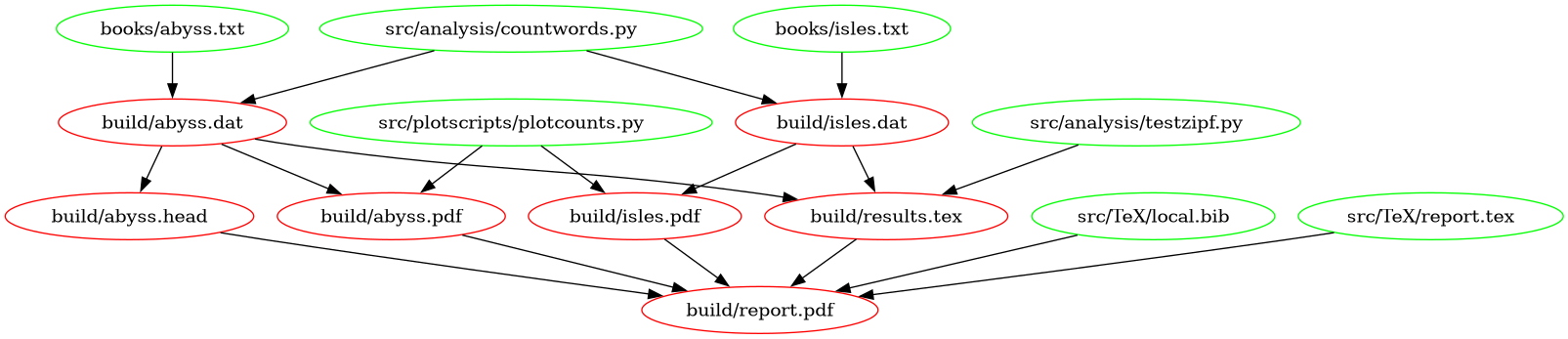
The following figure shows a graph of the dependencies embodied within our Makefile, involved in building the document:
- A well designed directory tree rather than a single heap of large scripts can make a project easier to understand.
- Separating plotting from calculation lets you focus on separate tasks separately and saves redoing expensive calculations when tweaking appearance.
- While the automatic variables in a Makefile look mysterious, they
support the DRY principle. Here we have used:
-
$(@D)which refers to the directory of the target of the current rule. -
$@which refers to the target of the current rule. -
$^which refers to the dependencies of the current rule. -
$<which refers to the first dependency of the current rule.
-
Content from Testing
Last updated on 2026-10-28 | Edit this page
Estimated time: 15 minutes
Overview
Questions
- Why have unit tests?
Objectives
- Self documenting Makefile.
- Use pytest for unit tests.
- Use coverage to check test coverage.
Use the following commands if you want to save your work from the previous episode
Now use the following to get files for this episode
which should yield
OUTPUT
.gitignore
Makefile
books/abyss.txt
books/isles.txt
src/TeX/local.bib
src/TeX/report.tex
src/analysis/countwords.py
src/analysis/testzipf.py
src/plotscripts/plotcounts.py
This episode is primarily about testing, but first we will make the Makefile self documenting. Try
OUTPUT
help : Holy mackerel! What is this?OUTPUT
	head -n 10 $< |awk '{print $$1, $$2}' > $@

.PHONY : clean
clean :
	rm -rf build

## help                 : Holy mackerel!  What is this?
.PHONY : help
help : Makefile
@sed -n 's/^## / /p' $<Self Documenting Makefiles
Explain how the help block at the end of the Makefile works and how you could use it to document the targets build/report.pdf, build/results.tex, build/abyss.head, clean, and help.
The sed command simply prints each line in the Makefile that starts with “## ”. Now we will edit the file to document each of those targets.
So far we have tested each incremental change of our code with something like
While that takes less than three seconds to redo all the calculations and build the final document, our toy research project is a surrogate for projects with calculations and other steps that take hours if not days. For such a project one can use unit tests to test each chunk of code quickly in isolation.
Unit Tests
Google AI says:
Unit tests are automated pieces of code written to verify that a small, isolated part of a software application, usually a single function or method, behaves as expected.
Pytest
We will use the utility pytest to run unit tests, and we will put the testing code in the directory tests/. Here is the block required in the Makefile:
## test                : Run pytest on tests/
.PHONY : test
test :
	pytest tests/
And here is the code for tests/test_countwords.py
PYTHON
"""test_countwords.py

debug with
$py.test --pdb tests/test_countwords.py
"""
import pytest
import pathlib

import analysis.countwords


@pytest.fixture(scope="function")
def shared_count_file(tmp_path_factory):
    # 1. Create a temporary directory using the factory
    temp_dir = tmp_path_factory.mktemp("shared_data")

    # 2. Create the file inside that directory
    count_file = temp_dir / "word_counts"
    count_file.write_text('{"status": "ready"}')

    return count_file


def test_word_count(shared_count_file):
    """Check reading books/abyss.txt

    """
    in_path = 'books/abyss.txt'
    analysis.countwords.word_count(in_path, shared_count_file)


def test_main(shared_count_file: pathlib.PosixPath):
    in_path = 'books/abyss.txt'
    analysis.countwords.main([in_path, f'{shared_count_file}'])
After making those changes to the project we can test testing with
pytest tests/
================================ test session starts ================================
platform linux -- Python 3.12.12, pytest-8.3.5, pluggy-1.5.0
rootdir: /mnt/precious/home/andy_nix/projects/SIAMDS27/learner_setup
plugins: anyio-4.9.0, cov-6.1.0, dependency-0.6.0
collected 2 items

tests/test_countwords.py ..                                                   [100%]

================================= 2 passed in 0.10s =================================
Next we introduce the utility coverage that reports on the sections of code that are covered by a collection of unit tests.
coverage.py
Google AI says:
Coverage.py is the standard, authoritative code coverage measurement tool for Python. […] it monitors your program during execution to track which lines of code have been run and which have not. It is primarily used to gauge the effectiveness and completeness of your test suites.
Here is a block for the Makefile
## coverage            : make test coverage report in build/htmlcov/
.PHONY : coverage
coverage :
	rm -rf .coverage build/htmlcov
	coverage run --source tests,src/analysis,src/plotscripts -m pytest tests
	coverage html -d build/htmlcov
	@echo To view: "firefox build/htmlcov/index.html & "
Let’s test that with
OUTPUT
rm -rf .coverage build/htmlcovcoverage run --source tests,src/analysis,src/plotscripts -m pytest tests
================================ test session starts ================================
platform linux -- Python 3.12.12, pytest-8.3.5, pluggy-1.5.0
rootdir: /mnt/precious/home/andy_nix/projects/SIAMDS27/learner_setup
plugins: anyio-4.9.0, cov-6.1.0, dependency-0.6.0
collected 2 items

tests/test_countwords.py ..                                                   [100%]

================================= 2 passed in 0.16s =================================
coverage html -d build/htmlcov
Wrote HTML report to build/htmlcov/index.html
To view: firefox build/htmlcov/index.html &
After looking at the result in a browser, we see that we should write tests for testzipf.py and plotcounts.py. We have written those and included them in the git branch 05-standards for the next episode.
- Use unit tests for finding bugs quickly, and checking changes.
- For Python code pytest works.
- Use a coverage tool for finding code that the testing suit missed.
- For Python code coverage works.
Content from Coding Standards
Last updated on 2026-10-22 | Edit this page
Estimated time: 15 minutes
Overview
Questions
- What tools can help achieve the objectives?
Objectives
- Enforce uniform style in the code.
- Partially compensate for duck-typing in Python code.
Use the following commands if you want to save your work from the previous episode
Now use the following to get files for this episode
which should yield
OUTPUT
Makefile
analyze.py
books/abyss.txt
books/isles.txt
src/TeX/local.bib
src/TeX/report.tex
src/analysis/countwords.py
src/analysis/testzipf.py
src/plotscripts/plotcounts.py
tests/test_countwords.py
tests/test_plotcounts.py
tests/test_testzipf.py
Put this block in the Makefile:
## pylintrc            : Fetch standard from google
pylintrc:
	wget https://google.github.io/styleguide/pylintrc

## lint                : Run pylint
.PHONY : lint
lint : pylintrc
	pylint --rcfile pylintrc src
And run pylint with
Well, let’s focus on one file
OUTPUT
************* Module analysis.countwords
src/analysis/countwords.py:32:0: W1405: Quote delimiter " is inconsistent with the rest of the file (inconsistent-quotes)
src/analysis/countwords.py:89:0: W1405: Quote delimiter " is inconsistent with the rest of the file (inconsistent-quotes)
src/analysis/countwords.py:59:12: C0103: Variable name "_tuple" doesn't conform to '^[a-z][a-z0-9_]*$' pattern (invalid-name)
After fixing those let’s try again
Let’s fix those and try again
OUTPUT
pylint --rcfile pylintrc srcCheck consistency of code style
YAPF Yet Another Python Formatter
Google AI says
YAPF is an open-source Python code formatter developed by Google. Unlike “opinionated” formatters like Black that enforce a single rigid standard, YAPF uses an algorithm inspired by clang-format to search for the “best” layout matching your specific configuration rules. It works by calculating the “lowest-cost” formatting decision to generate code that looks like an experienced human wrote it.
Let’s use the following block in the Makefile to run yapf
## yapf                : Force google format on all python code
.PHONY : yapf
yapf :
	yapf -i --recursive --style "google" src
In order to see what yapf does let’s first stage the files it might change
Since that looks good, we run yapf
OUTPUT
yapf -i --recursive --style "google" srcand check on the changes.
Check Python type hints
By default Python code does not check the types of data. At run time, the interpreter executes procedures that are appropriate for the type of the data, eg,
This is called duck typing.
Before running Python code, one can use tools such as mypy to look for consistency in types. To support that, Python supports type hints. EG,
BASH
$ cat > foo.py
a : str = '1'
b : str = '2'
print(a*b)
$ python foo.py
Traceback (most recent call last):
  File "/mnt/precious/home/andy_nix/projects/SIAMDS27/learner_setup/foo.py", line 3, in <module>
    print(a*b)
          ~^~
TypeError: can't multiply sequence by non-int of type 'str'
ds27$ mypy --strict foo.py
foo.py:3: error: Unsupported operand types for * ("str" and "str")  [operator]
Found 1 error in 1 file (checked 1 source file)
$ rm foo.py
Notice that mypy found the problem before running the code.
MYPY
Google AI says
Mypy is an optional static type checker for Python that analyzes your source code to detect bugs and type mismatches before your program ever runs. Because Python is traditionally a dynamically typed language, typos or invalid variable types normally crash your application at runtime. Mypy acts like a powerful linter, scanning your type annotations (type hints) to ensure type consistency across your codebase.
Here is the Makefile block that we will use to invoke mypy
## check-types         : Checks type hints
.PHONY : check-types
check-types:
	export MYPYPATH=$$PYTHONPATH; mypy --strict src/analysis
And here is what mypy has to say about our code
OUTPUT
export MYPYPATH=$PYTHONPATH; mypy --strict src/analysis
src/analysis/testzipf.py:9: error: Missing type parameters for generic type "list"  [type-arg]
src/analysis/testzipf.py:30: error: Missing type parameters for generic type "list"  [type-arg]
src/analysis/testzipf.py:45: error: Function is missing a type annotation  [no-untyped-def]
src/analysis/testzipf.py:84: error: Call to untyped function "main" in typed context  [no-untyped-call]
src/analysis/countwords.py:10: error: Function is missing a type annotation  [no-untyped-def]
src/analysis/countwords.py:29: error: Need type annotation for "counts" (hint: "counts: dict[<type>, <type>] = ...")  [var-annotated]
src/analysis/countwords.py:65: error: Function is missing a type annotation  [no-untyped-def]
src/analysis/countwords.py:85: error: Call to untyped function "word_count" in typed context  [no-untyped-call]
src/analysis/countwords.py:91: error: Call to untyped function "main" in typed context  [no-untyped-call]
Found 9 errors in 2 files (checked 2 source files)
make: *** [Makefile:49: check-types] Error 1
Let’s address those issues now.
- We use yapf to coerce Python code into standard use of white space.
- We use lint to detect deviations of our Python code from standards specified in pylintrc.
- We use mypy to check our use of Python type hints.
Content from Documentation
Last updated on 2026-10-22 | Edit this page
Estimated time: 15 minutes
Overview
Questions
- How can I use text in Python files as a source of documentation?
Objectives
- Setup Sphinx.
- Build documentation using text in the Python files.
Use the following commands if you want to save your work from the previous episode
BASH
$ git add Makefile pylintrc src/analysis/copuntwords.py src/analysis/testzipf.py src/plotscripts/plotcounts.py
$ git commit -m "my work"
Now use the following to get files for this episode from the branch 06-documentation
which should yield
OUTPUT
.gitignore
Makefile
books/abyss.txt
books/isles.txt
docs/source/_templates/custom-module-template.rst
docs/source/autodoc.rst
docs/source/conf.py
docs/source/index.rst
pylintrc
src/TeX/local.bib
src/TeX/report.tex
src/analysis/countwords.py
src/analysis/testzipf.py
src/plotscripts/plotcounts.py
tests/test_countwords.py
tests/test_plotcounts.py
tests/test_testzipf.py
In this episode, we will walk through setting up Sphinx for documentation from scratch, but first let’s again peek at the reuslt with the following:
The tail of the result is
OUTPUT
writing output... [100%] index
generating indices... genindex py-modindex done
highlighting module code... [100%] plotscripts.plotcounts
writing additional pages... search done
dumping search index in English (code: en)... done
dumping object inventory... done
build succeeded, 3 warnings.

The HTML pages are in build/docs/html.
and we can view the result with
Navigate to plotscripts:plotcounts and note that the page has information from running python src/plotscripts/plotcounts -h, the definition line of each function, and the docstring of each function.
Start from scratch
Now we will remove the built files, move the doc directory aside and start from scratch
OUTPUT
Welcome to the Sphinx 8.2.3 quickstart utility.

Please enter values for the following settings (just press Enter to
accept a default value, if one is given in brackets).

Selected root path: .

You have two options for placing the build directory for Sphinx output.
Either, you use a directory "_build" within the root path, or you separate
"source" and "build" directories within the root path.
> Separate source and build directories (y/n) [n]:
Answer the questions as follows:
BASH
> Separate source and build directories (y/n) [n]: y
> Project name: Zipf
> Author name(s): Bat Masterson
> Project release []:
> Project language [en]:
OUTPUT
Creating file /ROOT-PATH/source/conf.py.
Creating file /ROOT-PATH/source/index.rst.
Creating file /ROOT-PATH/Makefile.
Creating file /ROOT-PATH/make.bat.

Finished: An initial directory structure has been created.

You should now populate your master file /path/source/index.rst and create other documentation
source files. Use the Makefile to build the docs, like so:
   make builder
where "builder" is one of the supported builders, e.g. html, latex or linkcheck.
Let’s see what sphinx-quickstart installed and compare it to safe_docs
OUTPUT
docs:
Makefile  build  make.bat  source

safe_docs:
source
Our Makefile in the root directory has the following block:
## docs                : Run Sphinx to create documentation
.PHONY : docs
docs : build/docs/html/index.html

build/docs/html/index.html: docs/source/conf.py docs/source/index.rst
        sphinx-build -M html "docs/source" "build/docs"
That block replaces what we need in docs/Makefile and it directs the output from docs/build to build/docs. So, we remove the extraneous files in docs/ and look at docs/source
OUTPUT
docs/source/:
_static  _templates  conf.py  index.rst

docs/source/_static:

docs/source/_templates:
Now comparing to safe_docs/
we find that the relevant files are::
- source/_templates/custom-module-template.rst
- source/autodoc.rst
- source/conf.py
- index.rst
Now look at the differences
OUTPUT
   sphinx-quickstart on Sat Oct  3 20:14:28 2026.	      |	   sphinx-quickstart on Mon Oct  5 21:37:05 2026.
   Trees of docstrings <autodoc>			      <
So, we need a line in index.rst that invokes autodoc
Next check conf.py
The significant part of the output is
OUTPUT
							      >	extensions = []
							      >
extensions = '''sphinx_jinja sphinx.ext.autodoc sphinx.ext.vi <
    sphinx.ext.mathjax sphinx.ext.intersphinx sphinx.ext.cove <
    sphinx.ext.doctest sphinx.ext.autosummary		      <
    sphinx.ext.autosectionlabel sphinx.ext.napoleon	      <
    sphinx_argparse_cli'''.split()			      <
autosummary_generate = True				      <
templates_path = ['_templates']				      <
Before we put that block in docs/source/index.rst, we will look at the other two relevant files to get a feel for what’s going on
OUTPUT
Autodoc
=======

We use the autodoc feature of sphinx to extract documentation from
docstrings in Python scripts.  The autosummary feature of sphinx
recursively descends directory trees extracting documentation.  The
table below provides access to the roots of the extracted
documentation trees and indirectly to individual docstrings.

.. autosummary::
   :toctree: _autosummary
   :template: custom-module-template.rst
   :recursive:

   analysis
   plotscripts

Elsewhere in the documentation we can link to nodes
in trees.  For example, here is a link to the docstring of the code
that :doc:`makes for countwords.py
<_autosummary/analysis.countwords>`.
We can see the result of this block by searching for “autodoc” in the browser. The interesting bit is the autosummary block. Entering “sphinx autosummary” into Google brings up a helpful AI Overview and the documentation. Let’s look at the documentation. The “toctree” and “recursive” options are sort of clear, but we’ll need to look at custom-module-template.rst to understand the “template” option.
Yuck! If we ever understood all of that, it was a long time ago. However, we do want to point out a key feature that we find by searching for “cli”. That extension captures the output of eg, “python plotcounts.py -h” and formats it.
Fixing up docs/source
So, here’s the plan::
- Simply copy custom-module-template.rst and autodoc.rst from safe_docs to docs
- Edit conf.py and index.rst
- Build the docs
- Sphinx can move information from Python souce files to documentation.
- That supports the DRY principal.
- It also supports having good information in Python source files.