
No Hands
Last updated on 2026-10-28 | Edit this page
Overview
Questions
- How can we make a research project reproducible and comprehensible?
Objectives
- For reproducibility, entirely automate building the final document .
- Organize directory structure of the project.
- Break up monolithic code into understandable blocks.
- Separate plotting from calculations.
Use the following commands if you want to save your work from the previous episode
Now use the following to get files for this episode
which should yield
OUTPUT
.gitignore
Makefile
abyss.txt
analyze.py
isles.txt
local.bib
report.tex
src/analysis/countwords.py
src/analysis/testzipf.py
src/plotscripts/plotcounts.py
Next type
That should produce several screens of output and build the document as the file build/report.pdf. The last bit of output should be something like
OUTPUT
Output written on build/report.pdf (3 pages, 135727 bytes).
Transcript written on build/report.log.
Latexmk: Getting log file 'build/report.log'
Latexmk: Examining 'build/report.fls'
Latexmk: Examining 'build/report.log'
Latexmk: Found input bbl file 'build/report.bbl'
Latexmk: Log file says output to 'build/report.pdf'
Latexmk: Found bibliography file(s):
  ./local.bib
Latexmk: All targets (build/report.pdf) are up-to-date
Now look at the Makefile
OUTPUT
SHELL=bash  # This forces the actions below to run in bash shells

export PYTHONPATH := src
export TEXINPUTS := src/TeX//:
export BIBINPUTS := src/TeX//:
export BSTINPUTS := src/TeX//:

build/report.pdf : local.bib report.tex build/abyss.pdf build/isles.pdf build/results.tex build/abyss.head
	mkdir -p $(@D)
	latexmk --outdir=build -pdf report.tex

# A new feature of gnu-make as of version 4.3 supports making several
# targets with one rule.  See
# https://www.gnu.org/software/make/manual/make.html#Multiple-Targets

build/abyss.dat build/abyss.pdf &: analyze.py abyss.txt
	mkdir -p $(@D)
	python analyze.py abyss.txt build/abyss.dat build/abyss.pdf

build/isles.dat build/isles.pdf &: analyze.py isles.txt
	mkdir -p $(@D)
	python analyze.py isles.txt build/isles.dat build/isles.pdf

build/results.tex: src/analysis/testzipf.py build/abyss.dat build/isles.dat
	mkdir -p $(@D)
	python $^ --latex > $@

build/abyss.head : build/abyss.dat
	mkdir -p $(@D)
	head -n 10 $< |awk '{print $$1, $$2}' > $@

.PHONY : clean
clean :
rm -rf build *.pdf *.datExplain the Makefile
Write notes explaining each of the following:
- $(@D) in the action
mkdir -p $(@D) - &: in the line
build/abyss.dat build/abyss.pdf &: analyze.py abyss.txt - $^ in the action
python $^ --latex > $@ - $@ in the action
python $^ --latex > $@
- In an action, $(@D) is the directory of the target
- &: is a new feature of gnu make that supports multiple targets in a rule
- $^ is an automatic variable that represents the names of all the dependencies in a rule
- $@ is an automatic variable that represents the names of the target of a rule
Tasks
The key to making the build process entirely automatic, was extracting a bit of code from analyze.py and putting it in the new file src/analysis/testzipf.py.
In the following tasks we will extract other chunks of code from analyze.py and put them in locations with names that help identify what the chunks do.
Start by removing the rules in the Makefile that use analyze.py
Extract the word counting functionality from analyze.py
We will take the following code from analyze.py, modify it appropraitely, and put it in src/analysis/countwords.py
PYTHON
    with open(input_path, encoding='utf-8', mode='r') as input_fd:
        lines = input_fd.read().splitlines()

    counts = {}
    for line in lines:
        for purge in DELIMITERS:
            line = line.replace(purge, " ")
        words = line.split()
        for word in words:
            word = word.lower().strip()
            if word in counts:
                counts[word] += 1
            else:
                counts[word] = 1
    sorted_counts = sorted(list(counts.items()),
           key=lambda key_value: key_value[1],
           reverse=True)
    stripped = []
    for (word, count) in sorted_counts:
        if len(word) >= min_length:
            stripped.append((word, count))

    total = 0
    for count in stripped:
        total += count[1]
    percentage_counts = [(word, count, (float(count) / total) * 100.0)
              for (word, count) in stripped]

    top_two = [count for (_, count, _) in percentage_counts[0:2]]

    with open(dat_path, encoding='utf-8', mode='w') as output:
        for _tuple in percentage_counts:
            output.write(f"{' '.join(str(item) for item in _tuple)}\n")

    print(f'{top_two=}')
We will use the boilerplate in src/analysis/countwords.py
OUTPUT
"""countwords.py:  Count how often each word occurs in a file.

"""
import sys
import argparse

DELIMITERS = ". , ; : ? $ @ ^ < > # % ` ! * - = ( ) [ ] { } / \" '".split()


def word_count(input_path, output_path, min_length=1):
    """Calculate word frequencies in a file.

    Args:
        input_path: Path to book, eg, 'books/abyss.txt'
        output_path: Path to result, eg, 'build/abyss.dat'

    EG, Analyze 'books/abyss.txt' to produce 'build/abyss.dat' with
    first three lines:

    the 4044 6.354494028912634
    and 2807 4.410747957259585
    of 1907 2.9965430546825895

    """
    ###############Put relevant code here#########################

def main(argv=None):
    '''Parses command line and calls function to count words in a file

    '''

    if argv is None:  # Usual case
        argv = sys.argv[1:]

    # Parse command line
    parser = argparse.ArgumentParser(description='Count words in a file')
    parser.add_argument('input_path', help='Path to input, eg, books/abyss.txt')
    parser.add_argument('output_path',
                        nargs='?',
                        help='Path to result, eg, build/abyss.dat')
    parser.add_argument('--min_length',
                        type=int,
                        default=1,
                        help='Drop counts less than "min_length"')
    args = parser.parse_args(argv)

    word_count(args.input_path, args.output_path, args.min_length)

    return 0


if __name__ == "__main__":
    sys.exit(main())
After modifying src/analysis/countwords.py, we put the following in the Makefile.
build/abyss.dat : src/analysis/countwords.py abyss.txt
	mkdir -p $(@D)
	python $^ $@
Now we test the code with
OUTPUT
mkdir -p build
python src/analysis/countwords.py abyss.txt build/abyss.dat
top_two=[4044, 2807]
Check the result
Extract the plot functionality from analyze.py
We will take the following code from analyze.py, modify it appropraitely, and put it in src/plotscripts/plotcounts.py
PYTHON
    limited_counts = percentage_counts[0:limit]
    word_data = [word for (word, _, _) in limited_counts]
    count_data = [count for (_, count, _) in limited_counts]
    position = np.arange(len(word_data))
    width = 1.0
    fig = plt.figure()
    ax = fig.add_subplot(1, 1, 1)
    ax.set_xticks(position)
    ax.set_xticklabels(word_data)
    plt.bar(position, count_data, width, color='b')
    plt.title("Word Counts")
    ax.set_ylabel("Counts")
    ax.set_xlabel("Word")
Here is the boilerplate in src/plotscripts/plotcounts.py
PYTHON
""" plotcounts.py code to plot word counts for the Zipf project.
"""

import sys
import argparse
import numpy as np
import matplotlib.pyplot as plt

def load_word_counts(filename: str) -> list:
    """Read (word, count, percentage) tuples from a text file.

    Args:
        filename: Path of file to read

    Returns:
        A list of tuples (word:str, count:int, percentage:float)

    Lines starting with # are ignored.

    """
    counts = []
    with open(filename, encoding='utf-8', mode="r") as input_fd:
        for line in input_fd:
            if not line.startswith("#"):
                fields = line.split()
                counts.append((fields[0], int(fields[1]), float(fields[2])))
    return counts

def plot_word_counts(counts, limit=10):
    """
    Given a list of (word, count, percentage) tuples, plot the counts as a
    histogram. Only the first limit tuples are plotted.
    """

    ###################Need chunk of code from analyze.py here##################


def main(argv=None):
    '''Parses command line and calls functions to make specified plot

    '''

    if argv is None:  # Usual case
        argv = sys.argv[1:]

    # Parse command line
    parser = argparse.ArgumentParser(
        description='Make plots for documents or to view')
    parser.add_argument('--limit',
                        type=int,
                        default=10,
                        help='Limit plot the "limit" most frequent words')
    parser.add_argument('--show',
                        action='store_true',
                        help='Display result on screen')
    parser.add_argument('input_path', help='Path to input, eg, books/abyss.txt')
    parser.add_argument('output_path',
                        nargs='?',
                        help='Path to result, eg, build/abyss.pdf')
    args = parser.parse_args(argv)

    counts = load_word_counts(args.input_path)

    # Create matplotlib fig object
    fig = plot_word_counts(counts, args.limit)

    # Display if specfied
    if args.show or args.output_path == 'show':
        plt.show()
        return 0

    fig.savefig(args.output_path)

    return 0


if __name__ == "__main__":
    sys.exit(main())
After modifying src/plotscripts/plotcounts.py, we put the following in the Makefile.
build/abyss.pdf : src/plotscripts/plotcounts.py build/abyss.dat
	mkdir -p $(@D)
	python $^ $@
Now we test the code with
OUTPUT
mkdir -p build
python src/plotscripts/plotcounts.py build/abyss.dat build/abyss.pdfD.R.Y. (Don’t Repeat Yourself)
Wilson et al. say:
Anything that is repeated in two or more places is more difficult to maintain. Every time a change or correction is made, multiple locations must be updated, which increases the chance of errors and inconsistencies. […] applies to both data and code. […] this maxim holds that every piece of data must have a single authoritative representation in the system.
Now, we have the following block in the Makefile to build a dat file and a pdf for abyss
build/abyss.dat : src/analysis/countwords.py abyss.txt
	mkdir -p $(@D)
	python $^ $@

build/abyss.pdf : src/plotscripts/plotcounts.py build/abyss.dat
	mkdir -p $(@D)
	python $^ $@
we could copy that block and replace abyss with isles, but that would violate the DRY principle. Instead, let’s replace that block with
build/%.dat : src/analysis/countwords.py %.txt
	mkdir -p $(@D)
	python $^ $@

build/%.pdf : src/plotscripts/plotcounts.py build/%.dat
	mkdir -p $(@D)
	python $^ $@
Now test with
Explain the use of % in the Makefile
Write a short note
Google AI is correct in saying
In a Makefile, the % character acts as a wildcard operator used to create pattern rules and perform text substitution. It allows you to write a single generic rule that applies to multiple files sharing the same naming convention, significantly reducing redundancy.
Move report.tex and local.bib to src/TeX
First move the files with
Then modify the rule for build/report.pdf in the Makefile and test with
Move the abyss.txt and isles.txt to the directory books/
First move the files with
Then modify the rule for build/.dat* in the Makefile and test with
Clean up and Modify the target clean in the Makefile
List the files in the project root directory with
OUTPUT
Makefile analyze.py books build srcObserve that analyze.py is dead code, and after removing it all of the derived files are in the build directory. So the clean target can become
.PHONY : clean
clean :
	rm -rf build
After editing the Makefile, test with
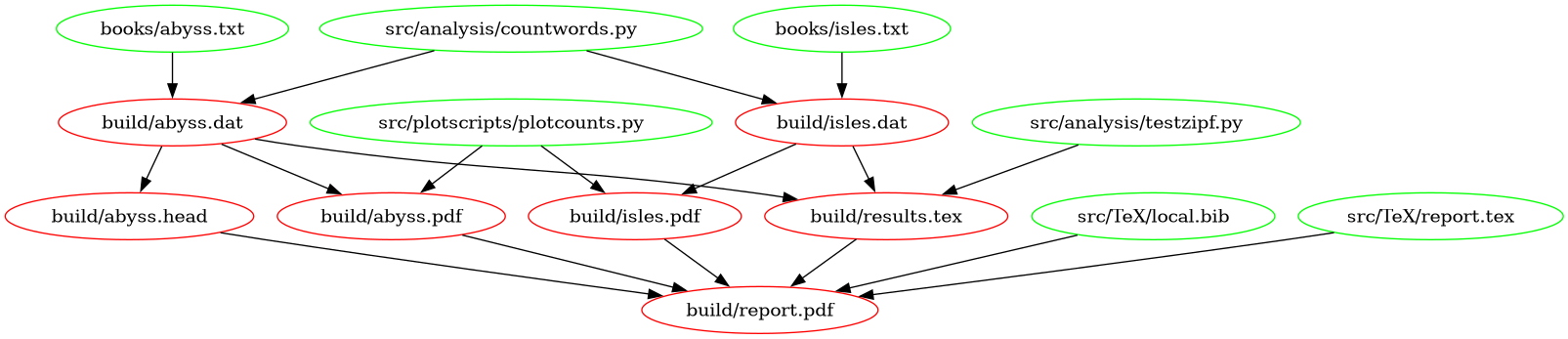
The following figure shows a graph of the dependencies embodied within our Makefile, involved in building the document:
- A well designed directory tree rather than a single heap of large scripts can make a project easier to understand.
- Separating plotting from calculation lets you focus on separate tasks separately and saves redoing expensive calculations when tweaking appearance.
- While the automatic variables in a Makefile look mysterious, they
support the DRY principle. Here we have used:
-
$(@D)which refers to the directory of the target of the current rule. -
$@which refers to the target of the current rule. -
$^which refers to the dependencies of the current rule. -
$<which refers to the first dependency of the current rule.
-